Published 3 April 2026
How to Finally Get a Date Out of the Group Chat
Tired of endless 'when does everyone work?' messages going nowhere? Here's the fastest way to stop the back-and-forth and actually lock in a date with your group.
You know how it goes. Someone posts "when does everyone work?" or "who's free next month?" in the group chat. A few people respond with vague non-commitments. Someone suggests a weekend. Someone else says they can't do that one. A third person hasn't read the messages yet. Two weeks later, nothing has been decided and the chat has moved on to something else entirely.
Getting a firm date out of a group chat is one of the most reliably frustrating things about organising anything with other people. But it does not have to be. This guide explains why group chats are so bad at scheduling and what actually works instead.
Why Group Chats Are Terrible for Scheduling
Group chats were designed for conversation, not decision-making. When you ask "when is everyone free?" in a group chat, a few things work against you:
People respond at different times. The group chat moves on. By the time the last person replies, nobody remembers what the earlier replies were.
Responses are not structured. One person says "weekends work for me," another says "not the 12th," a third sends a voice note, and a fourth just reacts with a thumbs up. Reconciling all of that into an actual answer requires someone to do mental gymnastics.
There is no single source of truth. Even if everyone responds, you have to scroll back through the thread to collate the information. It is easy to miss something or misremember.
Social pressure distorts answers. People see each other's responses. If one person says they can do any weekend, others may feel pressure to be equally flexible even if they actually have constraints.
It creates a coordination problem. Everyone is waiting for everyone else before they commit. Nobody wants to be the one who locks in a date that turns out not to work.
The result: weeks pass, enthusiasm fades, and the event either never happens or gets thrown together at the last minute with half the group missing.
The Fix: A Shared Availability Link
The solution is to take scheduling out of the chat entirely and give it its own dedicated space. Instead of asking everyone to reply in the chat, you share a link where each person can mark their availability privately and independently.
This removes the coordination problem. People do not need to wait for each other. They do not see what others have entered (unless you choose to show it). And you get a clean, structured picture of when everyone is free without having to scroll through a hundred chat messages.
WhosFreeWhen is built exactly for this. You create an event in under a minute, share the link in the group chat, and everyone marks the days they are free. The tool then shows you a colour-coded calendar of availability so you can pick the best date and announce it.
Step by Step: How to Lock in a Date
Here is the exact process that works:
Step 1: Create the event before you ask.
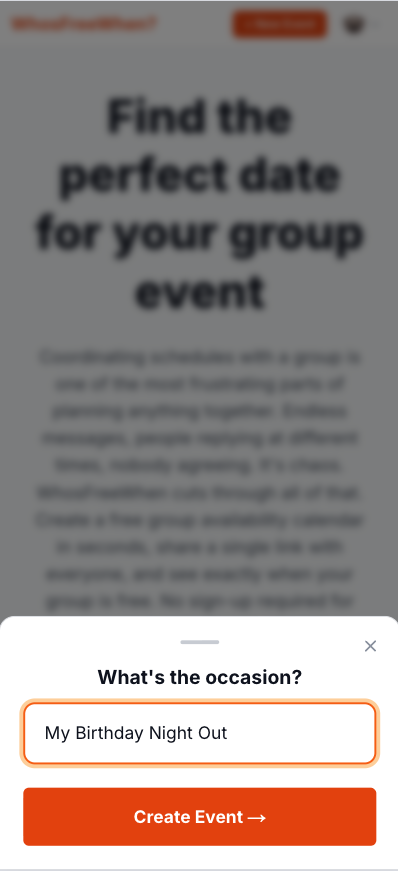
Do not ask "when is everyone free?" in the chat before you have somewhere to collect the answers. Create a WhosFreeWhen event first. Give it a name, set the date range you are considering, and copy the link. This takes about 60 seconds.
Step 2: Share the link with a clear call to action.
Once the event is created you get a unique shareable link. Copy it and drop it straight into your group chat. Instead of posting an open-ended question, post something like:
"Hey, trying to lock in a date for [event]. Can everyone click this link and mark which days you're free? Takes 20 seconds. [link]"
A specific ask with an estimated time commitment gets far more responses than an open question.
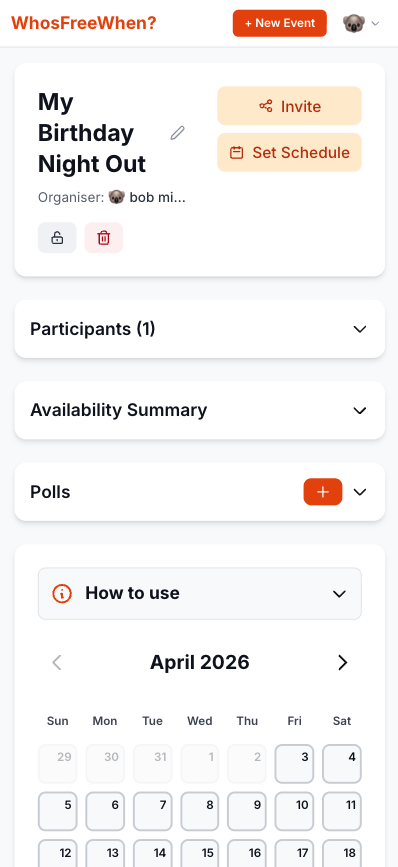
Step 3: Everyone marks their availability.
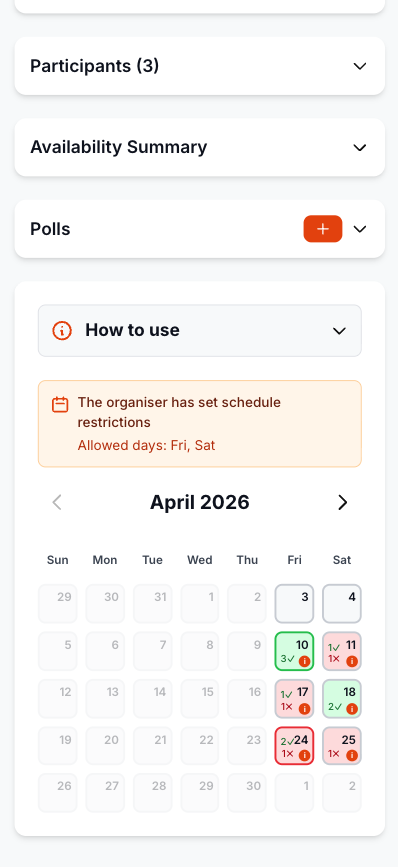
Participants open the link, pick a name, and tap the days they are free. No account, no app, no friction. Most people are done in under 30 seconds.
Step 4: Pick the best date and announce it.
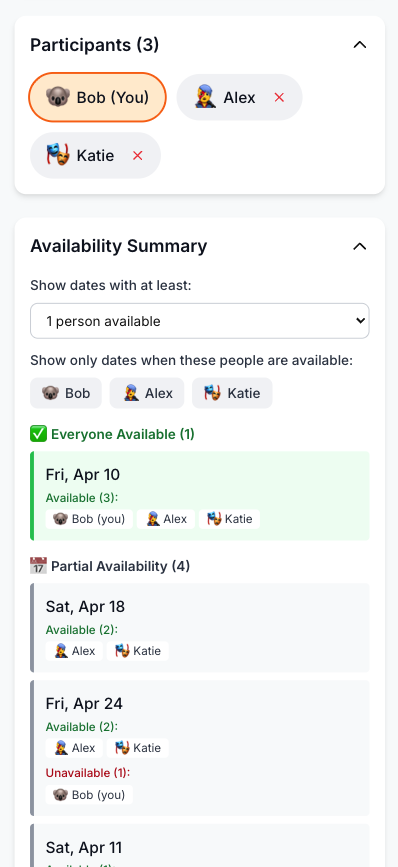
Once most people have responded, check the WhosFreeWhen results. The colour-coded view makes it immediately obvious which date has the best overlap. Pick that date, announce it in the chat, and add the event to your calendar.
The whole process, from first message to confirmed date, can happen in two or three days rather than two or three weeks.
Tips for Getting a High Response Rate
Even with a simple tool like WhosFreeWhen, there are a few things you can do to maximise the number of people who actually respond:
Keep the date range short. Asking people to review a 3-month range feels overwhelming. A 4 to 6 week window is usually enough for most events and is easier for people to think through.
Send the link directly, not buried in a long message. The link should be the most visible part of your message. If people have to hunt for it, some will not bother.
Give a deadline. "Can everyone fill this in by Sunday?" works much better than leaving it open-ended. Without a deadline, it is easy to forget.
Pick a date even if not everyone responds. Waiting for 100% participation almost never works. Once you have responses from most of the group, pick the best date. Latecomers can be updated separately.
Do not reopen the discussion in the chat. Once you have shared the link, resist the urge to let the chat become a parallel scheduling discussion. Direct people back to the link if they start suggesting dates in the chat.
What to Do When Someone Cannot Make the Best Date
This happens in almost every group. The date that works for the most people will not work for everyone.
The key is to make peace with this early. The goal is not the date that works for everyone (that date may not exist), it is the date that works for the most people. Pick it, announce it, and acknowledge the people who cannot make it. They will appreciate being considered even if they miss out this time.
WhosFreeWhen lets you filter availability by specific participants, which helps when certain people are more important to have there than others. If the guest of honour can only do the third weekend, that should carry more weight than a date that happens to work for the most total people.
Common Group Chat Scheduling Mistakes
Asking too early. If the event is three months away, most people cannot commit yet. Four to six weeks out is usually the sweet spot.
Giving too many options. Offering fifteen possible dates overwhelms people. Narrow it down to a realistic range before asking.
Being too vague. "Sometime in June" is not a question with a clear answer. Give people a specific calendar to respond to.
Letting perfect be the enemy of good. If you wait for a date that works for everyone in a group of ten people, you will be waiting forever. Find the best overlap and go with it.
Frequently Asked Questions
How do I share a WhosFreeWhen link in a group chat? Create your event at whosfreewhen.app, copy the link from the event page, and paste it directly into your group chat. It works in WhatsApp, iMessage, Telegram, Signal, and any other messaging app.
Do people need to download an app or sign up? No. They just open the link in their browser, pick a name, and tap the days they are free. It takes about 20 seconds.
What if the group chat is on WhatsApp and people do not click links? Try adding context: "It's just a free calendar thing, takes 20 seconds." Reassuring people that there's nothing to download or sign up for usually overcomes hesitation.
Can I see who has and hasn't responded yet? Yes. The WhosFreeWhen results page shows all participants who have added their availability. You can see at a glance who is missing and follow up with them directly.
What if two dates have the same number of people free? Use the filter feature to check which date works for the most important people (the host, the guest of honour, or whoever is hardest to reschedule around), and prioritise that one.
Conclusion
The group chat is not the right tool for scheduling. It is great for conversation and sharing things, but it is fundamentally bad at collecting structured information from multiple people at different times.
The fix is simple: stop asking questions in the chat and start sharing links. Create a WhosFreeWhen event, share the link with a clear ask, and let the tool do the work of collecting and displaying everyone's availability. You will have a confirmed date in days instead of weeks.
Create your free event and share the link the next time you need to get a date out of the group chat.