Published 3 April 2026 · Updated 6 September 2026
Best Free WhenAvailable Alternative for Group Scheduling (2026)
WhenAvailable requires Google Calendar access just to respond. Find out why WhosFreeWhen is a better free alternative that works for everyone in your group, no accounts needed.
More than just a scheduling poll
Finding the date is only the start. WhosFreeWhen adds the insights and nudges that get your whole group from “sometime soon” to a confirmed date, all on the same page.
WhenAvailable positions itself as a modern, calendar-connected group scheduling tool. The idea is appealing: connect your Google Calendar and let the tool automatically figure out when you are free. But there is a significant catch. Every person in your group needs to connect their Google Calendar to respond.
For many groups, that is a deal-breaker. Not everyone uses Google Calendar. Not everyone is comfortable connecting their calendar to a third-party app. And asking your friends or family to do that just to say whether they can make your birthday dinner adds unnecessary friction that tanks your response rate.
This guide covers why WhosFreeWhen is a better free alternative to WhenAvailable for most group scheduling situations.
What Is WhenAvailable?
WhenAvailable is a group scheduling tool built around calendar integration. Participants connect their Google Calendar, and the tool automatically imports their availability. The organiser can then see the overlap without participants having to manually mark anything.
The appeal is obvious: less work for participants. But the approach has some real-world limitations that matter when you are trying to coordinate a group of real people.
The Problem With WhenAvailable's Approach
Google Calendar is a hard requirement. Anyone who does not use Google Calendar (Apple Calendar users, Outlook users, or people who just do not manage their schedule digitally) cannot participate without creating a Google Calendar account. This immediately excludes a portion of most groups.
Calendar access feels invasive. Asking people to grant a third-party app access to their entire calendar is a big ask, even if the tool only reads free/busy information. Many people will decline or simply not bother.
It does not work for guests or one-off respondents. If you are inviting someone who is not in your regular social circle (a colleague you do not know well, a family member who is not tech-forward), asking them to connect their Google Calendar is a significant barrier.
Automatic import misses personal context. Just because someone has no events on a Saturday does not mean they are free. People use calendars differently, and many do not block out every personal commitment. The result is that automatic availability can be inaccurate.
WhosFreeWhen: A Simpler, More Inclusive Alternative
WhosFreeWhen takes the opposite approach. Rather than connecting to external calendars, it gives each participant a simple date grid and lets them tap the days they are free. No accounts, no integrations, no permissions.
This approach has several advantages for real-world group scheduling:
Anyone can respond. It does not matter whether your group uses Google Calendar, Apple Calendar, Outlook, or no calendar at all. If they can open a link on their phone, they can respond.
It respects privacy. Participants only share what they choose to share. They tap the days they are free without granting any app access to their personal calendar or data.
Higher response rates. Fewer barriers means more people actually complete the form. The difference between a link that opens instantly and one that asks for Google Calendar access can easily be the difference between 10 responses and 3.
Takes seconds, not minutes. Participants pick a name and tap their available days. The whole process takes about 15 seconds.
Feature Comparison: WhosFreeWhen vs WhenAvailable
| Feature | WhosFreeWhen | WhenAvailable |
|---|---|---|
| Cost | Free plan, one-time Pro upgrade | Free (limited) |
| Account required (participants) | No | Yes (Google) |
| Calendar integration | No | Required |
| Works without Google | Yes | No |
| Manual availability entry | Yes | Optional |
| Mobile-friendly | Yes | Yes |
| Colour-coded results | Yes | Yes |
| Filter by participant | Yes | Limited |
| Group polls | Yes (Pro) | No |
| Privacy (no calendar access) | Yes | No |
| App download required | No | No |
How to Use WhosFreeWhen
No calendar connection needed. No accounts for anyone.
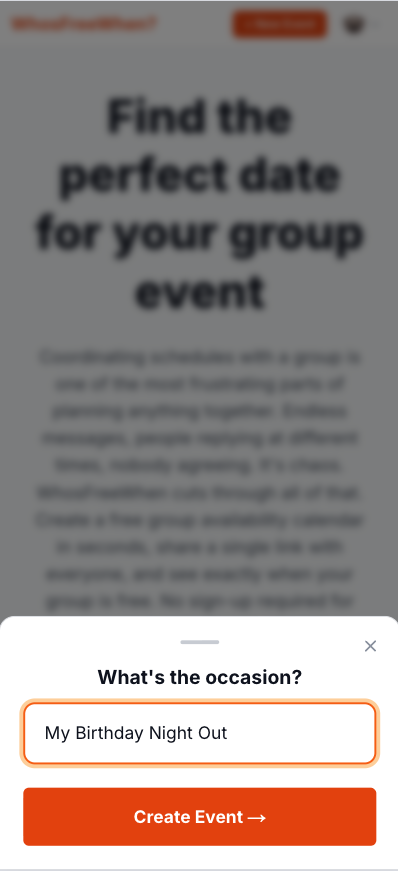
1. Create your event. Give it a name and set the date range you are trying to fill. Done in about 30 seconds.
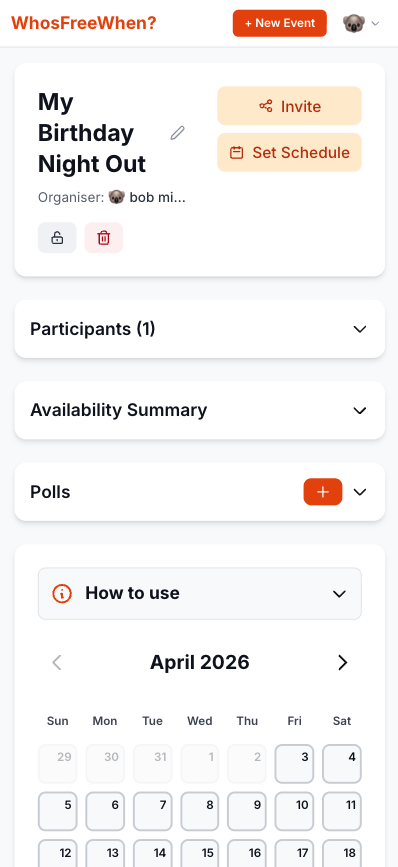
2. Share the link. Copy your event link and paste it wherever your group communicates. No one needs to install anything to open it.
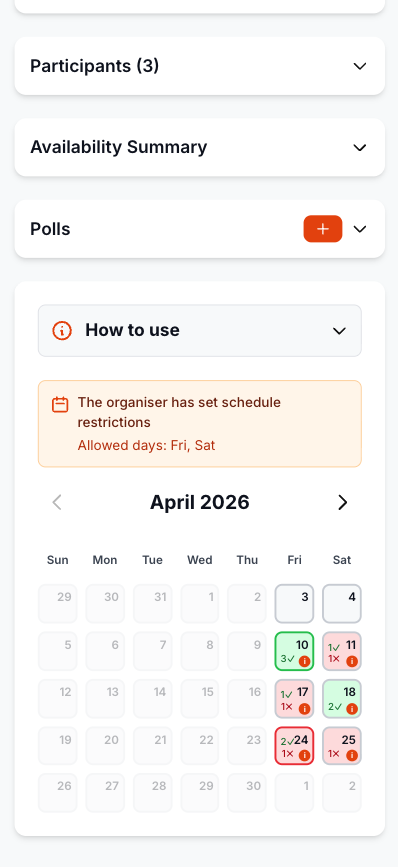
3. Participants mark their free days. People open the link, pick a name, and tap the days they are available. No Google account, no sign-up of any kind.
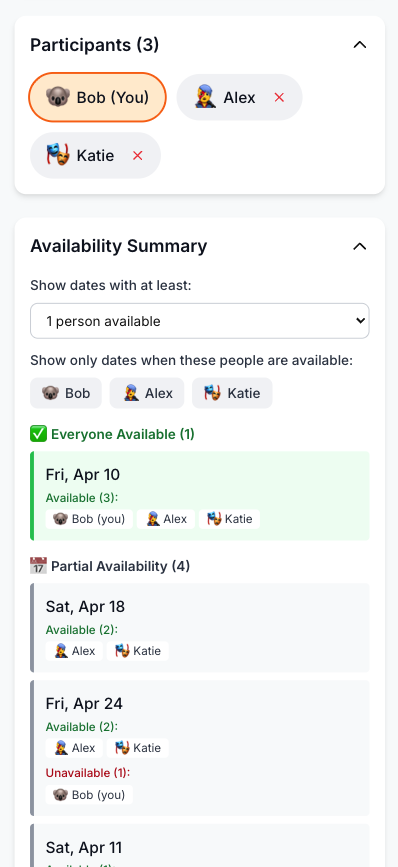
4. Find the best date. The colour-coded results show which dates work for the most people. You can also filter to prioritise specific participants.
How to Get Started With WhosFreeWhen
- Go to whosfreewhen.app
- Give your event a name and pick a date range
- Share the link with your group however you normally communicate (WhatsApp, text, email)
- Everyone opens the link, picks a name, and taps the days they are free
- View the colour-coded results and pick the date with the best overlap
No one needs to connect anything. No one needs to create an account. The whole flow takes seconds per person.
Frequently Asked Questions
Do participants need any kind of account to use WhosFreeWhen? No. Participants just enter a name and mark their available days. No email, no password, no calendar connection of any kind.
Can I still use WhosFreeWhen if I want to plan around my actual calendar? Yes. Participants check their own calendar manually and then mark the days they are free. This takes a few seconds and means the availability they enter is deliberate and accurate.
Is WhosFreeWhen completely free? The free plan includes one active event for up to five participants, with no account required for responders. Pro is a one-time upgrade for unlimited events and participants plus additional organiser features.
What if some people in my group use Google Calendar and some do not? WhosFreeWhen works for everyone regardless of which tools they use. The manual entry approach is the great equaliser for mixed groups.
Conclusion
WhenAvailable is a thoughtful tool for teams where everyone is already using Google Calendar. But for most groups (friends, family, mixed work groups, sports teams), requiring Google Calendar access creates exactly the kind of friction that kills response rates and leaves you back in the group chat trying to nail down a date.
WhosFreeWhen is the better free alternative: no accounts, no integrations, just a simple link that everyone in your group can respond to in seconds.
Create a free event on WhosFreeWhen and see the difference it makes.