Published 21 June 2026 · Updated 6 September 2026
Best Free Lettucemeet Alternative for Group Scheduling (2026)
Lettucemeet is a solid When2Meet style tool, but it has limits. Discover the best free Lettucemeet alternative for groups that want a faster, friendlier way to find a date.
More than just a scheduling poll
Finding the date is only the start. WhosFreeWhen adds the insights and nudges that get your whole group from “sometime soon” to a confirmed date, all on the same page.
Lettucemeet built a reputation as a friendlier, more modern take on the classic When2Meet grid. It is free, it does not require an account, and plenty of groups use it to figure out meeting times. But if you have used it more than a few times, you have probably noticed it still asks people to do more work than it needs to.
If you are searching for a free Lettucemeet alternative that is quicker for your group to fill in and gives you a clearer view of who is actually free, this guide covers what Lettucemeet does well, where it falls short, and why WhosFreeWhen is worth trying instead.
What Is Lettucemeet?
Lettucemeet is a free scheduling tool built as a more visually polished alternative to When2Meet. Organisers create an event with a set of possible dates or times, share a link, and participants shade in the slots when they are available. The grid then highlights where the group overlaps.
It is a genuine improvement on the original grid-based tools in terms of design. The interface is cleaner, the colours are easier to read, and the overall experience feels less like a relic of the early internet.
Where Lettucemeet Falls Short
Lettucemeet solves some of the visual problems of older scheduling grids, but a few core issues remain.
It is still slot based. Participants are asked to shade in individual time blocks rather than simply tapping the days they can do. For a work meeting that might make sense, but for a weekend trip, a birthday dinner, or a group catch up, ticking off entire days is far quicker and less fiddly.
Filling it in on a phone is still a bit of a chore. The grid layout works better than older tools, but selecting precise time blocks with a thumb is never as smooth as tapping a single day. Groups with less tech-confident members often see slower response rates because of this.
It is a single purpose tool. Lettucemeet does availability and that is about it. There is no way to run a quick poll about venue, food, or activity alongside the date itself, so organisers end up bouncing between tools or starting a separate group chat conversation for everything else.
Limited views once responses come in. It can be hard to quickly filter results down to just the people who matter most for a final decision, for example the core group versus optional invitees.
WhosFreeWhen: The Best Free Lettucemeet Alternative
WhosFreeWhen keeps what makes Lettucemeet appealing, free to use, no account needed to respond, and a shareable link, while fixing the friction points that slow groups down.
Full days instead of time slots. Participants tap the days they are free rather than shading individual blocks. For the vast majority of social plans, this is all you need, and it takes a fraction of the time to fill in.
Built for mobile from the start. Tapping a calendar day works naturally on any phone, with no zooming or precise dragging required. That alone tends to mean more people actually finish the form instead of giving up halfway through.
Group polls alongside availability. Need to settle on a venue, decide what to order, or vote on an activity? With Pro you can run a poll right in the same event, so you are not juggling separate links or starting a new thread for every decision.
Clear, colour-coded results. The summary view shows which dates have the strongest overlap at a glance, and you can filter by specific participants when you need to prioritise certain people in the final decision.
Zero friction for the people you invite. No account, no password, no app download. Just a name and a tap.
Feature Comparison: WhosFreeWhen vs Lettucemeet
| Feature | WhosFreeWhen | Lettucemeet |
|---|---|---|
| Cost | Free plan, one-time Pro upgrade | Free |
| Ads | None | None |
| Account required (organiser) | Optional | No |
| Account required (participants) | No | No |
| Mobile-friendly | Yes | Fairly good |
| Full-day availability | Yes | No (time slots only) |
| Colour-coded results | Yes | Yes |
| Filter by participant | Yes | Limited |
| Group polls | Yes (Pro) | No |
| App download required | No | No |
How to Use WhosFreeWhen
Setting up an event takes under a minute, and nobody you invite needs to create an account.
1. Create your event. Give it a name and choose the date range you want to check.
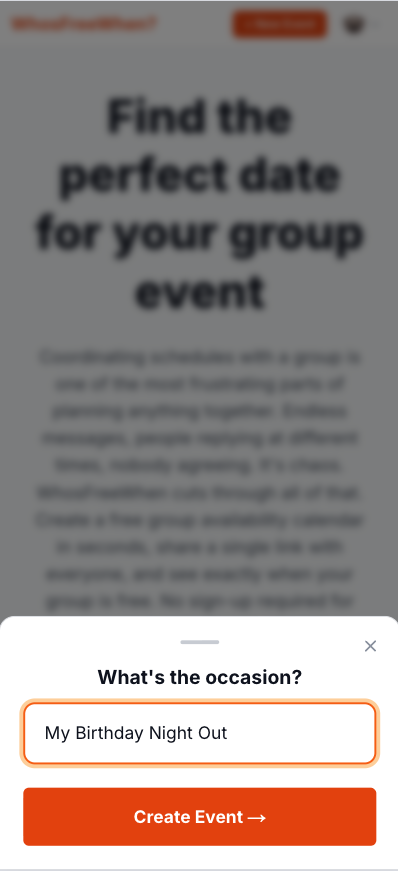
2. Share the link. Drop it into WhatsApp, a text message, or an email. One link works for everyone.
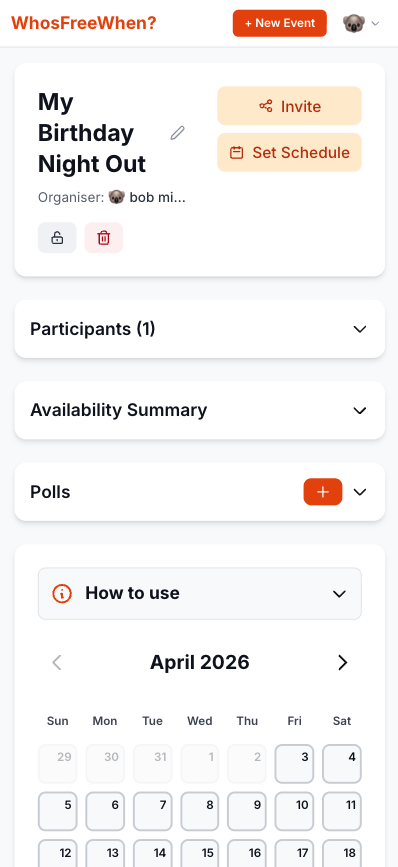
3. Everyone taps their free days. No sign-up, no app. It works the same on any phone or browser.
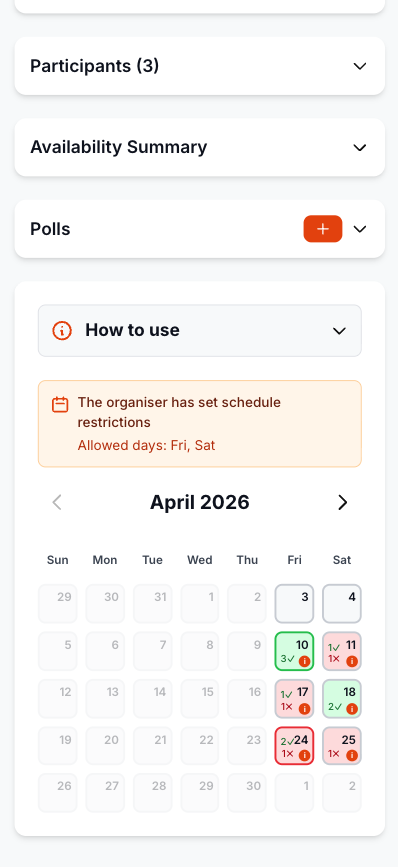
4. Pick the date with the best overlap. The colour-coded results make it obvious which day works for the most people.
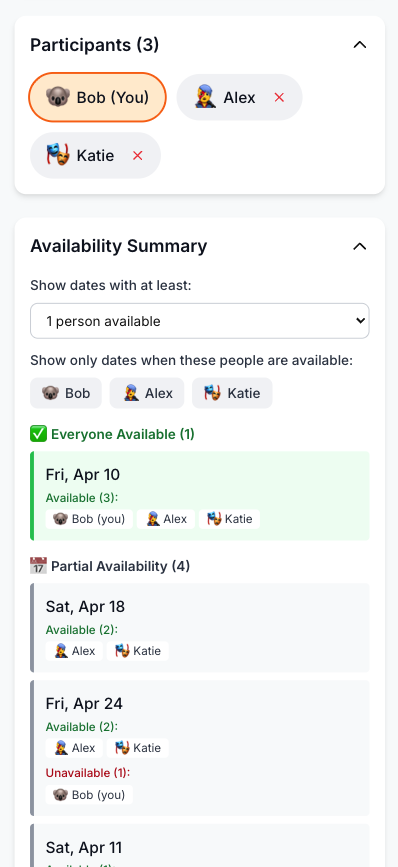
How to Make the Switch
Moving from Lettucemeet to WhosFreeWhen takes only a few steps:
- Go to whosfreewhen.app
- Name your event and choose a date range
- Share the link with your group
- Everyone taps the days they are free, no sign-up required
- Check the colour-coded summary and lock in the best date
Because the process asks so little of each participant, you tend to get more responses, and you get them faster.
Frequently Asked Questions
Is WhosFreeWhen really free, like Lettucemeet? Yes. There are no ads, and responders never need a paid tier or account. The free plan includes one active event for up to five participants; Pro removes those limits with a one-time upgrade.
Do participants need to sign up? No. They just enter a name and tap their available days. There is no email, password, or account required.
Can I see who is free on which days? Yes. The results view colour-codes each date by how many people are available, and you can filter to see specific participants if you need to prioritise certain people.
What if I need precise time slots rather than full days? Choose hourly availability when you create the event. You can also use whole days or a morning/afternoon split, so participants only enter as much detail as the plan needs.
Can I use it for more than just finding a date? Yes. With Pro you can run group polls within the same event to decide on things like venue or activity, so you are not managing several tools at once.
Conclusion
Lettucemeet improved on the classic scheduling grid, but it still leans on time slots and keeps availability and decision making as separate problems. WhosFreeWhen takes a flexible approach: selectable time granularity, a mobile-first interface, and group polls on Pro, all wrapped in an ad-free tool that is easy to share.
Try WhosFreeWhen for free and see how much smoother finding a date with your group can be.