Published July 22, 2026 · Updated September 6, 2026
Best Free NeedToMeet Alternative for Group Scheduling (2026)
NeedToMeet is a free scheduling tool, but it was built for a different era of the web. Discover the best free NeedToMeet alternative for groups who want something faster and mobile-friendly.
In short
NeedToMeet still works for desktop meeting scheduling, but it feels dated on phones, and response rates suffer. WhosFreeWhen? is a free, mobile-first alternative: one link, no sign-up for anyone, and results that are easy to read.
More than just a scheduling poll
Finding the date is only the start. WhosFreeWhen adds the insights and nudges that get your whole group from “sometime soon” to a confirmed date, all on the same page.
NeedToMeet has been around for a long time, and for a free tool that does not require sign-up, it does the job well enough. But if you have sent a NeedToMeet link to a group recently and watched the response rate trail off, you probably noticed the experience has not kept pace with how people actually use their phones today.
If you are looking for a free NeedToMeet alternative that is quicker for your group to fill in and easier to read once the results come in, this guide covers what NeedToMeet does well, where it shows its age, and why WhosFreeWhen is worth a look.
What Is NeedToMeet?
NeedToMeet is a free, browser-based scheduling tool that lets organizers propose a set of time slots and then collect availability from participants via a shared link. No one in the group needs to create an account to respond, which has made it a popular choice for coordinating meetings and events where the organizer does not want to impose any software on their group.
The concept is solid: you set up a grid of possible times, share a link, and people fill in when they are free. The tool then highlights where the most overlap exists so you can pick a time with confidence.
Where NeedToMeet Falls Short
NeedToMeet gets the basics right, but a few areas make it frustrating for modern groups, especially those coordinating on mobile.
The interface feels dated. NeedToMeet was designed in an era when most people filled in forms on a desktop browser. The layout is functional, but it is not the kind of clean, modern experience that encourages a group of friends or colleagues to click through and complete it quickly. First impressions matter more than you might think when you are waiting on eight people to respond.
It is built around time slots rather than full days. This works for back-to-back business meetings, but for planning a birthday dinner, a weekend trip, a group catch-up, or any social event where the specific hour is not yet decided, it is unnecessary friction. Asking someone to shade in hourly blocks when you just want to know if they are free on Saturday is a poor match for the question you are actually trying to answer.
Mobile usability is a struggle. Selecting time slots accurately on a small phone screen, dragging across a grid without accidentally deselecting, zooming in to tap the right block: none of this is fun. Groups where most members use their phones as their primary device often see lower response rates with grid-based tools precisely because the experience asks too much of them.
No built-in decision support beyond the grid. Once you have the availability data, NeedToMeet shows you the heat map and leaves the rest to you. There is no way to run a quick poll about venue, food options, or which activity the group prefers alongside the date-finding exercise.
WhosFreeWhen: The Best Free NeedToMeet Alternative
WhosFreeWhen keeps what makes NeedToMeet worth using, primarily that it is free, requires no account from participants, and produces a clear picture of group availability, while removing the friction that costs you responses.
Flexible availability detail. Participants can tap whole days for a social plan, choose broader parts of a day, or mark hourly slots for a meeting. The organizer selects the right granularity instead of forcing every group through the same grid.
Built for mobile from day one. Tapping a calendar date on a phone feels natural. There is no grid to navigate, no zooming required, and no accidental deselection when your thumb moves slightly. That simplicity is what gets more of your group to actually complete it.
Group polls alongside availability. Once you know which date works, you often have other decisions to make: where to go, what to eat, which activity to choose. WhosFreeWhen lets you run those polls inside the same event on Pro, so you are not bouncing between tools or starting a new thread for every question.
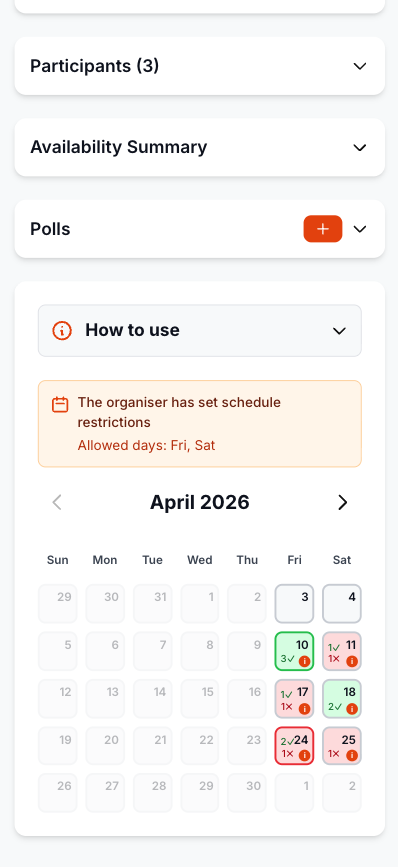
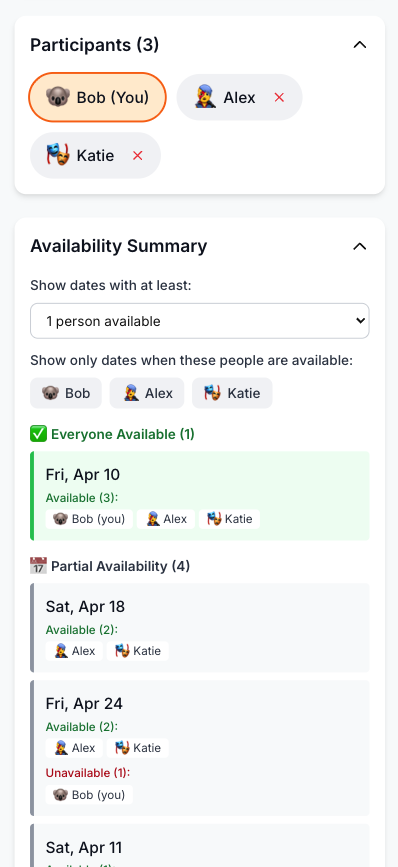
Cleaner results view. The results page color-codes each date by how many people are available. You can see the best option at a glance, and if you need to prioritize certain people in the final decision, you can filter the view to focus on them.
Zero barrier for participants. No account, no password, no app to download. Open the link, enter a name, tap the days you're free. That's it.
Feature Comparison: WhosFreeWhen vs NeedToMeet
| Feature | WhosFreeWhen | NeedToMeet |
|---|---|---|
| Cost | Free plan, one-time Pro upgrade | Free |
| Account required (organizer) | Optional | No |
| Account required (participants) | No | No |
| Mobile-friendly | Yes | Limited |
| Whole-day availability | Yes | No (time slots only) |
| Optional hourly availability | Yes | Yes |
| Color-coded results | Yes | Yes |
| Filter by participant | Yes | No |
| Group polls | Yes (Pro) | No |
| Modern interface | Yes | Dated |
| App download required | No | No |
How to Use WhosFreeWhen
Getting started takes under a minute, and your group will not need to do anything except open a link.
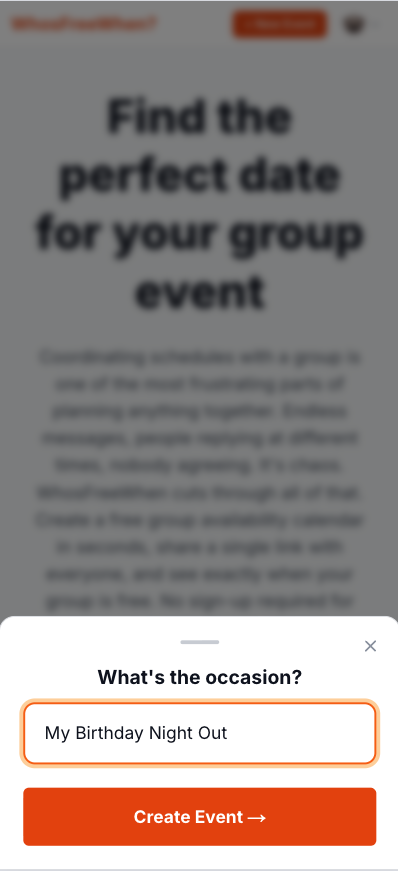
1. Create your event. Head to whosfreewhen.app, name your event, and choose the date range you want to check. A window of four to six weeks is usually enough for most plans.
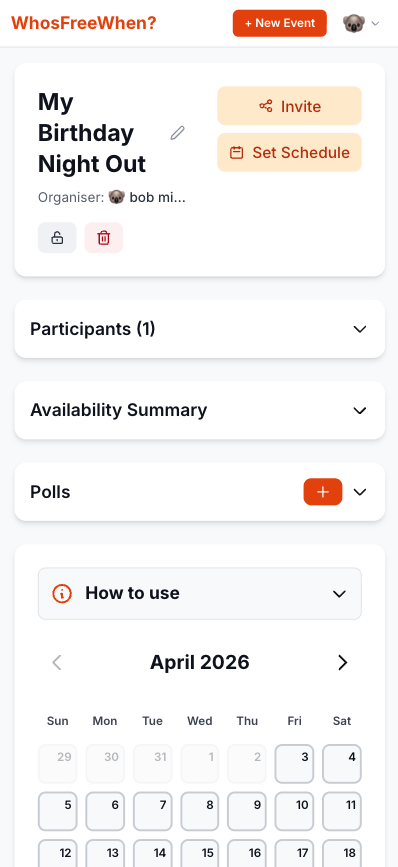
2. Share the link. Drop it into WhatsApp, a text message, or an email. One link works for everyone, on any device.
3. Everyone taps their free days. Each person opens the link, enters their name, and taps the days they can do. No sign-up, no app, no hassle.
4. Pick the best date. The color-coded results make it obvious which day has the most overlap. Choose it, confirm the plan, and you're done.
How to Make the Switch
If you have used NeedToMeet before, the process here is almost identical, just a bit quicker for everyone involved:
- Go to whosfreewhen.app
- Name your event and choose a date range
- Copy the shareable link
- Send it to your group, ideally with a brief message like "Takes 20 seconds, just tap the days you are free"
- Come back in a day or two and check the results
- Pick the best date and let everyone know
The key difference is that the organizer can choose whole days, parts of a day, or hourly slots. Social groups can keep responses quick, while work groups can collect the precision a meeting requires.
Getting a Good Response Rate
The tool does a lot of the heavy lifting, but a few small habits help even more.
Add a short deadline. "Can everyone fill this in by Thursday?" consistently outperforms leaving it open-ended. Without a deadline, people put it off. With one, most will respond within the first 24 hours.
Mention the time it takes. "Takes about 20 seconds" in your message removes the mental barrier of assuming it is a big task. It is not, and telling people that upfront helps.
Send one reminder. If a few people have not responded after a couple of days, a quick message pointing directly to the link is enough. You do not need to chase everyone individually.
Pick a date even if a few people haven't responded. Waiting for complete participation is rarely worth the delay. Once you have responses from most of the group, pick the best date. People who did not respond can sort it out once the date is announced.
Frequently Asked Questions
Is WhosFreeWhen actually free, like NeedToMeet? Yes. There are no ads, and participants can always respond without an account. The free plan includes one active event for up to five participants; a one-time Pro upgrade removes those limits and unlocks extra organizer features.
Do participants need to sign up or download anything? No. They open the link, type a name, and tap their free days. Nothing to install, no account required.
What if I need to schedule meetings with specific times rather than just picking a day? Choose hourly availability when you create the event. WhosFreeWhen also supports whole days and a morning/afternoon split, so you can match the response grid to the level of precision your meeting needs.
Can I see which specific people are free on each day? Yes. The results page shows you the color-coded overview, and you can look at individual responses to see exactly who is available on any given date.
What if I want to also decide on a venue or activity at the same time? You can run a group poll inside the same event. Once the date question is sorted, you can ask the group about anything else you need to decide, all in one place.
Conclusion
NeedToMeet has served as a reliable free scheduling tool for years, and for desktop users coordinating business meetings with specific time slots, it still does the job. But for groups planning social events on their phones, it asks a little too much of people, and that friction shows up in slower, patchier response rates.
WhosFreeWhen takes the same core idea, a shareable link where everyone marks their availability, and makes it work the way people actually use their phones today. Selectable time granularity, a clean mobile interface, and group polls on Pro keep the decisions in one place.
Try WhosFreeWhen for free and see how quickly your group can agree on a date.