Published July 23, 2026 · Updated September 6, 2026
Best Free Google Forms Alternative for Group Scheduling Polls (2026)
Using Google Forms or Sheets to schedule group availability? See why WhosFreeWhen is a faster, purpose-built free alternative, with color-coded results and no manual tallying.
In short
Google Forms can collect availability, but you have to build date checkboxes by hand and tally the results in a spreadsheet. WhosFreeWhen? is a free, purpose-built alternative: share one link and get an instant, color-coded view of when everyone is free.
More than just a scheduling poll
Finding the date is only the start. WhosFreeWhen adds the insights and nudges that get your whole group from “sometime soon” to a confirmed date, all on the same page.
Google Forms is free, familiar, and already sitting in most people's Google account, so it is a natural first reach when you need to ask a group about their availability. Create a form, list some dates as checkboxes, share the link, and wait for responses. The problem shows up after people respond: you are left staring at a spreadsheet of responses trying to manually work out which date has the most ticks, updating it by hand as replies trickle in, and re-sharing results because Forms has no simple public results view for this kind of use.
If you have ever built a Google Form just to schedule a group hangout and then spent ten minutes cross-referencing a spreadsheet afterwards, this guide is for you. Here is why a purpose-built tool like WhosFreeWhen beats the Google Forms/Sheets combo for group scheduling, and how to switch.
Why People Use Google Forms for Scheduling, and Where It Falls Short
Google Forms was never designed for scheduling. It is a general-purpose survey tool, which is exactly why it needs so much manual work to repurpose for availability:
- No visual results. Forms dumps responses into a spreadsheet or a basic summary chart. There is no color-coded calendar showing at a glance which date works best.
- Manual tallying. For anything beyond a handful of responses, you are counting checkboxes yourself or writing a spreadsheet formula to do it.
- Awkward for date ranges. Listing every date as a separate checkbox option gets unwieldy fast if you are flexible across a few weeks rather than choosing between five fixed options.
- No live updates for the group. Participants cannot see who else has responded or where the group currently stands, so nobody knows if it is worth chasing for more replies.
- Not built for follow-up. There is no easy way to filter by person, remove a response, or add a group poll for the next decision once the date is set.
It works, in the sense that a spreadsheet works for anything if you're willing to build it yourself. It just is not a good use of anyone's time.
What to Look for Instead
- Purpose-built for availability, not a repurposed survey form.
- Automatic, visual results. No manual counting or spreadsheet formulas.
- Date-range friendly, so you are not listing dozens of individual checkboxes.
- No sign-up required for anyone filling it in.
- Actually free, with nothing bolted on afterwards.
WhosFreeWhen: A Free, Purpose-Built Alternative to Google Forms for Scheduling
WhosFreeWhen replaces the whole Forms-plus-Sheets workflow with a single link. You pick a date range once, instead of building a list of checkbox options, and everyone taps the days they are free directly on a calendar.
No spreadsheet required. Results are calculated and displayed automatically the moment someone responds.
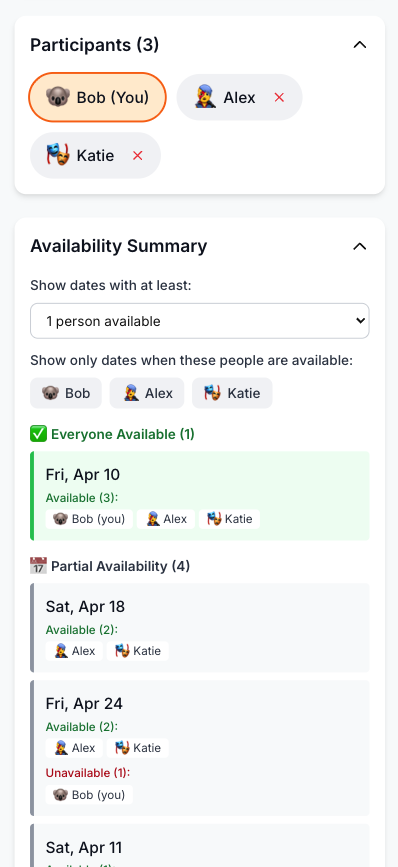
Color-coded results, live. Every date is shaded by how many people are free, updating in real time as responses come in, so you always know exactly where the group stands.
Handles date ranges properly. Want to check every day over the next month? Set the range once. No need to create thirty checkbox options like you would in a Form.
Filter by participant. See instantly which dates work for a specific subset of people, something a spreadsheet pivot table would take real effort to replicate.
Group polls built in with Pro, for deciding on anything beyond the date, without building a second form.
Feature Comparison: WhosFreeWhen vs Google Forms (for Scheduling)
| Feature | WhosFreeWhen | Google Forms + Sheets |
|---|---|---|
| Cost | Free plan, one-time Pro upgrade | Free |
| Built for scheduling | Yes | No, repurposed survey tool |
| Manual tallying needed | No | Yes |
| Color-coded results | Yes | No |
| Date-range availability | Yes | Awkward, manual checkbox list |
| Live results as people respond | Yes | Only via manual spreadsheet refresh |
| Filter by participant | Yes | Requires spreadsheet skills |
| Account required (organizer) | Optional | Yes (Google account) |
| Account required (participants) | No | No, but sign-in can be required |
| Group polls | Yes (Pro) | Would need a second Form |
| Mobile-friendly response | Yes | Yes |
How to Use WhosFreeWhen
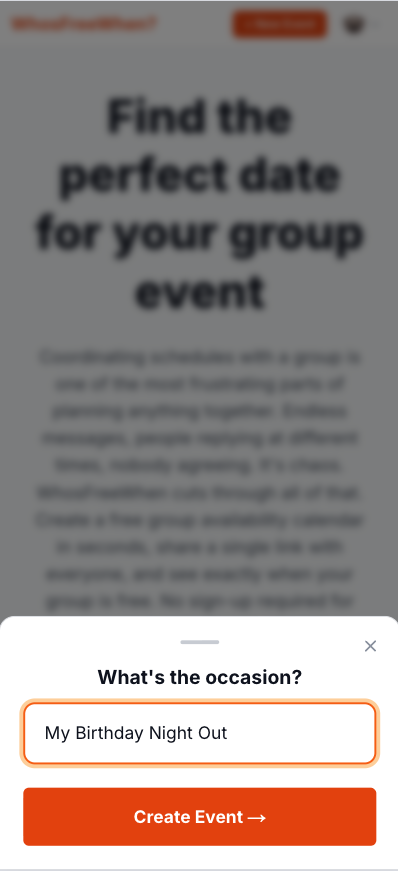
1. Create your event. Give it a name and set the date range you're checking, no need to enumerate individual dates as options.
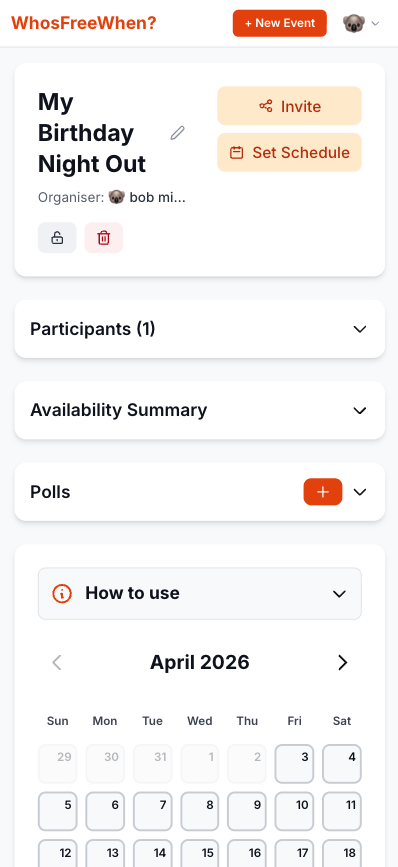
2. Share the link. Send it wherever your group already talks: WhatsApp, email, or text.
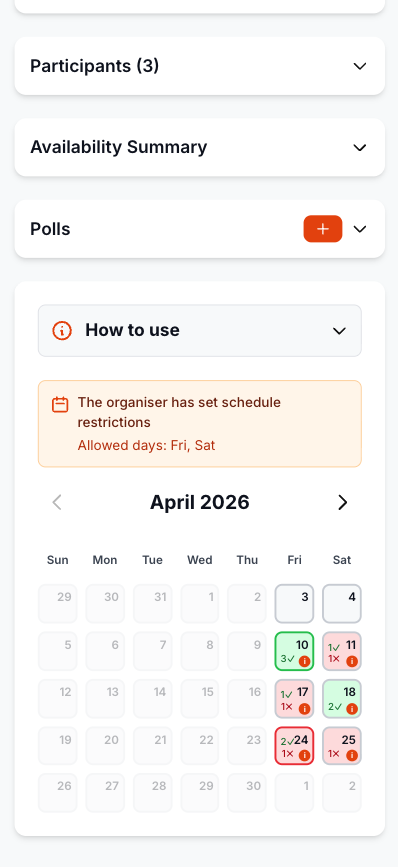
3. Everyone marks their availability. No account, no form fields to fill in, just tap the free days.
4. See the results instantly. No spreadsheet, no manual counting. The color-coded calendar shows the best date immediately.
How to Switch from Google Forms to WhosFreeWhen
- Go to whosfreewhen.app
- Name your event and set a date range instead of listing individual date checkboxes
- Share the link with your group
- Everyone marks the days they're free, no sign-in required
- Watch the color-coded results update live and pick the best date
Frequently Asked Questions
Is WhosFreeWhen really free, like Google Forms? The free plan supports one active event with up to five participants, with no spreadsheet building or responder accounts required. Pro is a one-time upgrade for unlimited events and participants.
Do I need a Google account to use WhosFreeWhen, the way Forms requires one to organize? No. You can create an event without an account, and participants never need one to respond.
Can WhosFreeWhen handle a wide date range, like Forms struggles with? Yes, that is exactly what it is built for. Set a start and end date once, and everyone marks every day they're free within it, no checkbox list required.
What about the results, does someone still need to interpret a spreadsheet? No. Results are shown as a color-coded calendar automatically, no formulas or manual counting needed.
Conclusion
Google Forms can technically be bent into a scheduling tool, but it means building checkbox lists by hand and tallying results in a spreadsheet afterwards. WhosFreeWhen does the job it was actually built for: pick a date range, share one link, and get an instant, visual answer for when your group is free. All for free, with no account needed to respond.
Create your first free event on WhosFreeWhen and skip the spreadsheet entirely.